Toggle Nav
 Inspire.
Create.
Stitch.
Inspire.
Create.
Stitch.
Inspire.
Create.
Stitch.
Search
Inspire.
Create.
Stitch.
All fonts on Designs by JuJu now have BX files included, allowing you to use them like keyboard fonts in programs such as Embrilliance. So, even if you have purchased fonts in the past, you can download them again to get the BX files free!
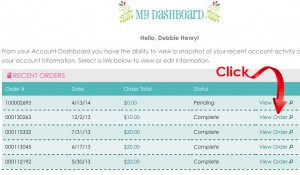
You can download files you have ordered any time, day or night. Click on ACCOUNT and log into your account.

MY DASHBOARD comes up. It lists pending and previous orders.

Select a past order and click on VIEW ORDER.
Under VIEW ORDER, select any font you previously ordered and click on DOWNLOAD FILES. Your files will download to your designated location.

Go to your file download location and select the folder you just downloaded. Click EXTRACT ALL FILES and the zipped folder unzips all font formats. [link to downloading files blog]
Double click on the folder designated BX. It lists all selected fonts in the BX format.

The BX fonts are now ready to install in your Embrilliance program so they can be used as keyboard fonts.